

Industrial Mini PC for Machine Vision: Key Features for Vision Inspection

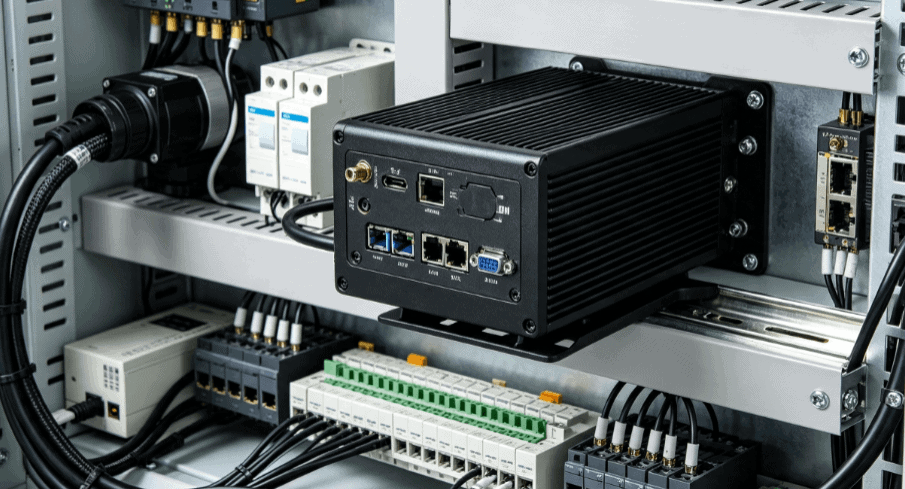
Machine vision systems have become the “eyes” of the modern smart factory. These systems perform high-speed inspections, dimensional gauging, and defect detection with a precision that human operators cannot match. However, the reliability of these inspections depends heavily on the hardware processing the visual data.
A standard desktop computer often fails in the harsh conditions of a production line. Instead, engineers rely on an industrial mini PC for machine vision to act as the central processing unit. These compact yet powerful devices are designed to handle high-bandwidth data from cameras while surviving heat, dust, and electrical interference.
Understanding the specific features that define an industrial-grade controller is essential for any automation project. Choosing the wrong hardware leads to dropped frames, system latency, and expensive downtime.

The Role of the Mini PC in Modern Vision Architectures
In a typical vision inspection setup, the industrial mini PC serves as the bridge between the optical sensors and the PLC (Programmable Logic Controller). It captures raw image data through high-speed interfaces and runs complex algorithms to identify anomalies.
Unlike general-purpose computers, these units are built for 24/7 operation. They provide the deterministic performance required to keep up with high-speed conveyor belts. If the PC lags by even a few milliseconds, a defective product may pass through the line undetected.
Beyond processing, the mini PC also manages the synchronization between the camera trigger and the lighting system. This coordination ensures that every frame is captured under perfectly controlled conditions.
High-Bandwidth Connectivity: Interfacing with Cameras
The most critical feature of an industrial mini PC for machine vision is its I/O (Input/Output) capability. Machine vision cameras generate massive amounts of data that must be transferred to the CPU without bottlenecks.
Power over Ethernet (PoE) and GigE Vision
Most professional vision systems utilize the GigE Vision standard. Industrial mini PCs often feature multiple independent PoE (Power over Ethernet) ports. This allows a single cable to provide both data connectivity and power to the camera, simplifying cable management in tight spaces. Independent controllers for each port ensure that bandwidth is not shared, preventing data loss during multi-camera inspections.
USB 3.0 and 3.1 Gen 2
For short-range, high-speed applications, USB 3.0 ports are standard. However, industrial versions include “locking” connectors to prevent cables from shaking loose due to machine vibration. These ports must provide stable voltage to ensure the camera’s CMOS sensor operates within its thermal and electrical specifications.
Dedicated GPIO for Real-Time Triggering
Vision inspection is time-sensitive. Industrial mini PCs feature General Purpose Input/Output (GPIO) pins that allow for hardware-level triggering. When a sensor detects a part on the line, it sends a signal directly to the PC, which then triggers the camera and strobe light with microsecond precision.
Processing Power: CPU vs. GPU Acceleration
Machine vision software, such as Matrox Imaging, Cognex VisionPro, or OpenCV, requires significant computational resources. The choice of processor determines the “cycle time” of the inspection.
- Multi-core CPUs: High-clock speed processors (such as Intel Core i5 or i7) are necessary for traditional rule-based inspections, such as measuring the diameter of a machined part.
- GPU and AI Inference: Modern inspection systems often use Deep Learning (AI) to identify complex defects like scratches on brushed metal. An industrial mini PC equipped with an integrated GPU or a dedicated AI accelerator (like an NVIDIA Jetson module or Intel Movidius) can process neural networks much faster than a CPU alone.
- RAM Latency: High-speed DDR4 or DDR5 memory is vital. The system must move image buffers from the network card to the memory and then to the processor instantly.
Thermal Management and Fanless Design
The environment inside a manufacturing plant is often the enemy of electronics. Dust, oil mist, and ambient heat can quickly destroy a standard PC with cooling fans.
Engineers prefer fanless industrial mini PCs for several reasons. A fanless design uses the entire outer chassis as a heat sink. This eliminates the “vacuum cleaner effect” where a fan pulls metallic dust or debris into the internal circuitry, leading to short circuits.
Furthermore, moving parts are prone to failure. By removing the fan, the mean time between failures (MTBF) of the computer increases significantly. These units are often rated to operate in temperatures ranging from -20°C to 70°C, ensuring stability even in non-climate-controlled warehouses.
Mechanical Durability: Vibration and Shock Resistance
Vision systems are frequently mounted directly onto moving machinery or robotic arms. In these environments, constant vibration can loosen internal components like RAM sticks or SSDs.
Industrial-grade mini PCs utilize:
- Solid State Storage (SSD): No moving platters, making them immune to mechanical shock.
- M.2 and Soldered Components: Components are secured with screws or soldered directly to the motherboard to prevent disconnection.
- MIL-STD-810G Compliance: Many high-end units are tested against military standards for vibration, ensuring they can withstand years of use on a high-speed press or CNC machine.
Wide Voltage Input and Electrical Protection
Factory power grids are notoriously “dirty.” Large motors turning on and off can cause voltage spikes and electromagnetic interference (EMI).
An industrial mini PC designed for vision systems typically supports a wide DC input range (e.g., 9V to 36V). This allows the PC to be powered directly from the machine’s existing 24V DC power supply. Additionally, these units feature over-voltage and over-current protection to shield the sensitive internal components from electrical surges.
Integration with Industrial Systems
When evaluating hardware from specialized providers like Industrial-TabletPC, it is important to look for “long-term availability.” Unlike consumer hardware that changes every six months, industrial PCs are available for 5 to 7 years. This ensures that if a machine is built today, the same replacement parts will be available years later, simplifying maintenance and software licensing.
The compact form factor of these PCs allows them to be mounted via DIN-rail or VESA mounts inside electrical cabinets. This saves valuable floor space and keeps the controller close to the cameras to minimize cable length and signal degradation.
FAQ: Selecting an Industrial Mini PC for Machine Vision
1. Why can’t I use a standard NUC for machine vision?
While a standard NUC (Next Unit of Computing) has the processing power, it lacks industrial I/O like isolated GPIO and PoE. More importantly, consumer NUCs rely on fans that will eventually clog with factory dust, leading to thermal throttling and system failure.
2. How many cameras can a single industrial mini PC handle?
This depends on the resolution and frame rate. A typical Intel Core i7 mini PC can usually handle 2 to 4 GigE cameras at 60 FPS. For more complex 3D vision or 8K inspection, you may need a unit with a dedicated GPU.
3. What is the benefit of a “wide temperature” rating?
In many factories, ambient temperatures near the ceiling or inside cabinets can exceed 40°C (104°F). A standard PC will shut down to protect itself at these temperatures, whereas a wide-temperature industrial PC will continue to operate reliably up to 60°C or 70°C.
4. Is a GPU always necessary for vision inspection?
No. Traditional tasks like barcode reading, OCR (Optical Character Recognition), and simple measurements are CPU-intensive. A GPU is primarily needed for Deep Learning-based inspections where the software must “recognize” patterns or textures.
5. What mounting options are best for machine vision PCs?
DIN-rail mounting is the industry standard for electrical cabinets. If the PC is being mounted to the side of a machine, a VESA mount or wall-mount bracket with vibration-dampening rubber grommets is recommended.
Reference Sources
- IEEE Xplore: Research on Hardware Acceleration in Machine Vision Systems
- AIA (Automated Imaging Association): GigE Vision Standard Overview
- Intel IoT Solutions: Technical Specifications for Industrial Embedded Processors
- European Machine Vision Association (EMVA): Standards for Camera and PC Interfaces