

Industrial Edge Computing Mini PC Selection Guide for Smart Factories

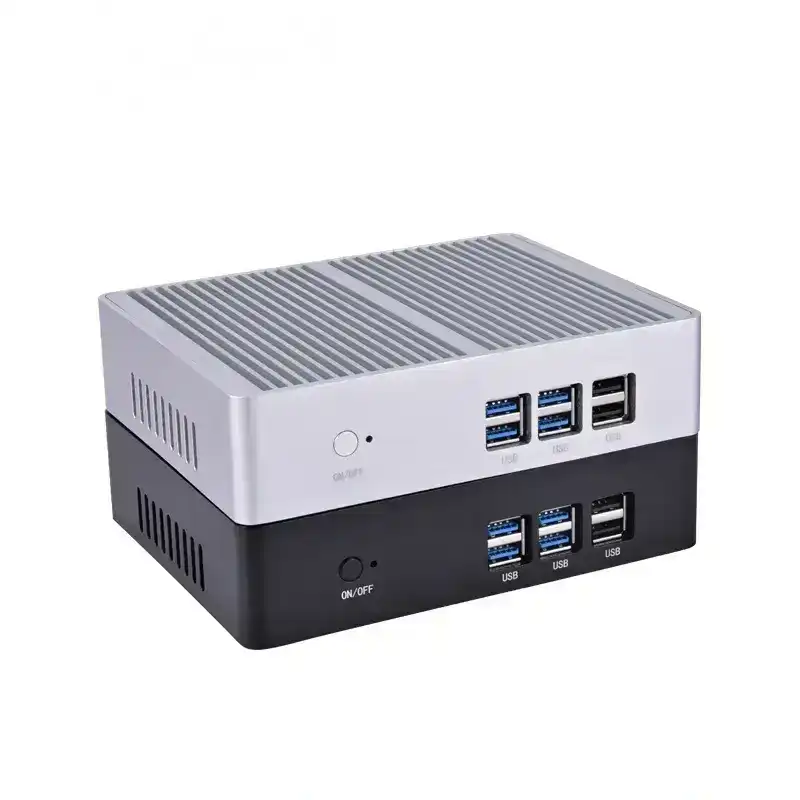
The transition toward Industry 4.0 has shifted the data processing burden from centralized cloud clusters to the “edge”—the actual factory floor where latency can determine the success or failure of a production line. An industrial edge computing mini PC acts as the localized brain, processing massive datasets from PLC controllers, sensors, and vision systems in real-time.
Unlike standard commercial desktops, these units must operate in environments characterized by electromagnetic interference (EMI), high humidity, and constant vibration. For engineers and solution providers, selecting the wrong hardware leads to more than just a system crash; it results in expensive downtime and potential equipment damage.
Why Architecture Matters: ARM vs. x86 in Edge Computing
The first decision in hardware selection involves the processor architecture. This choice dictates software compatibility and the complexity of the tasks the edge node can handle.
- ARM-Based Architectures: Typically used for lightweight IoT gateways. These are ideal for simple protocol conversion (e.g., Modbus to MQTT) where power consumption must be kept to a minimum.
- x86-Based Architectures (Intel/AMD): These are the standard for smart manufacturing. Whether utilizing Intel Atom for low-power data logging or Intel Core i5/i7 for machine vision and AI inference, x86 architecture supports the Windows and Linux environments required by most SCADA and ERP integrations.
For high-performance edge analytics, current industry standards lean toward 11th or 12th Gen Intel Core processors, which provide the necessary instruction sets for AI-accelerated workloads without the thermal footprint of a full-sized server.
Critical Hardware Dimensions for Industrial Environments
Selecting an industrial mini PC requires a departure from “spec-sheet” shopping. You must evaluate the hardware based on its physical and electrical resilience.
1. Passive Cooling and Thermal Management
In a wood processing plant or a textile mill, airborne particulates will clog a traditional fan in weeks. A fanless design is mandatory. These systems use “finned” aluminum alloy chassis that act as a giant heat sink. When evaluating a unit, check the TDP (Thermal Design Power) rating and ensure the chassis can dissipate heat effectively at 100% CPU load in ambient temperatures exceeding 50°C.
2. Wide Voltage and Power Protection
Factory power grids are notoriously “dirty.” Sudden voltage spikes from heavy machinery startups can fry sensitive electronics. Professional edge PCs should support a wide DC input range (typically 9V–36V) and include:
- OVP (Over Voltage Protection)
- OCP (Over Current Protection)
- Reverse Polarity Protection
3. Industrial I/O and Legacy Support
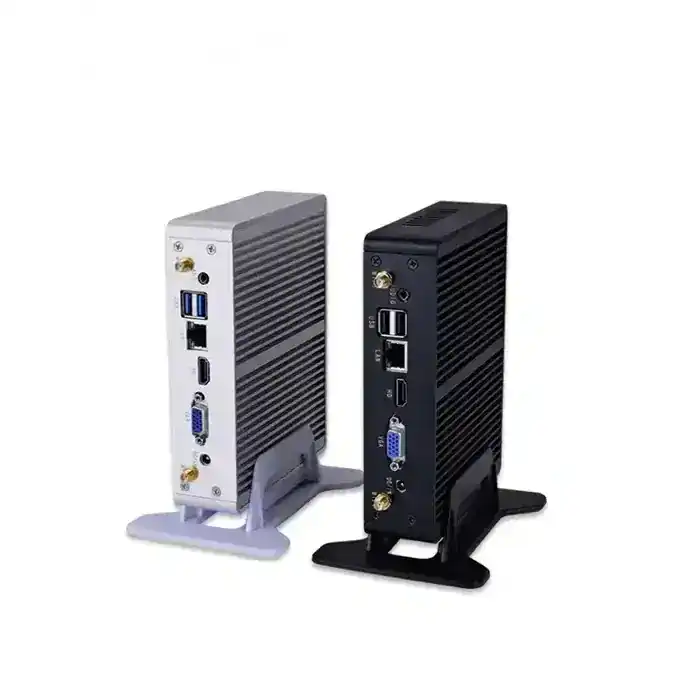
While the world has moved to USB-C, the factory floor still runs on RS-232, RS-485, and CAN bus. An edge computing node must bridge the gap between modern IT and legacy OT (Operational Technology). Look for units providing:
- Dual or Quad GLAN: For network redundancy or separating the internal machine network from the external corporate WAN.
- Isolated DIO (Digital Input/Output): To allow the PC to interact directly with sensors and actuators without electrical interference.
- Expansion Slots: Mini-PCIe or M.2 slots for adding 5G modules or AI accelerators like the Hailo-8 or Intel Movidius.
Matching Hardware to Smart Manufacturing Scenarios
Not every edge node requires the same level of performance. Selection should be dictated by the specific “Workload Profile.”
| Application Scenario | Recommended CPU | Critical Feature |
| IoT Gateway / Data Logging | Intel Celeron / Atom | Low power, Compact size |
| Predictive Maintenance | Intel Core i3 / i5 | High MTBF, 24/7 reliability |
| Machine Vision / AI Inspection | Intel Core i7 + GPU/NPU | High-speed I/O, NVMe storage |
| CNC Control / Motion Control | Intel Core i5 (Real-time OS) | Low Jitter, Isolated I/O |
Data Aggregation and Protocol Conversion
If the goal is simply to collect data from 50 sensors and push it to an Azure or AWS cloud, a compact, low-power unit like the Celeron-based series is sufficient. The focus here is on connectivity—ensuring enough COM ports and stable Wi-Fi/LTE failover.
Machine Vision and Quality Inspection
Automated Optical Inspection (AOI) requires significant computational throughput. Processing high-resolution frames to detect microscopic defects in real-time demands an Intel Core i7 or equivalent. Furthermore, these units must support high-speed storage (NVMe) to log image data for traceability without creating a bottleneck.
Physical Integration: Mounting and Ruggedization
The best hardware is useless if it cannot be mounted where the action happens. In smart manufacturing, space is a premium.
- DIN-Rail Mounting: Essential for placing the PC inside a standard electrical cabinet alongside PLCs.
- Wall/VESA Mount: Common for HMI (Human Machine Interface) applications where the PC is mounted behind a display.
- Vibration Resistance: If the PC is mounted directly onto a robotic arm or a moving gantry, it must be rated for shock and vibration (often following MIL-STD-810G standards). Using M12 connectors instead of standard RJ45 can prevent cables from shaking loose in high-vibration environments.
The Role of Customization in OEM/ODM Projects
For large-scale deployments, off-the-shelf solutions may have unnecessary features that drive up costs or lack a specific required port. Working with a manufacturer that offers customization services—such as BIOS modification, custom I/O plates, or branded enclosures—ensures the hardware fits the project’s exact technical and budgetary requirements.
Final Selection Checklist for Engineers
Before finalizing a procurement order, verify the following:
- Operating Temperature: Does it match the highest recorded temperature in your facility?
- Certification: Does it carry CE/FCC or UL certifications required for your region?
- Lifecycle Support: Will this hardware be available for purchase for the next 5–10 years? (Crucial for maintaining standardized factory fleets).
- Ingress Protection: Is an IP65-rated (waterproof/dustproof) enclosure needed, or will a standard IP40 fanless unit suffice?
By prioritizing environmental resilience and I/O density over raw clock speed, solution providers can build edge computing infrastructures that remain stable for years, providing the backbone for truly “smart” manufacturing.
FAQ
Q: Can I use a high-end consumer Mini PC for edge computing if I put it in a cooled cabinet?
A: It is not recommended. Even in a cooled cabinet, consumer PCs lack industrial-grade capacitors and “dirty” power protection. They also lack the long-term availability (lifecycle) of industrial units, making it difficult to replace identical units three years later.
Q: What is the benefit of Dual LAN in an industrial mini PC?
A: Dual LAN allows for network isolation. One port connects to the “Plant Floor” (OT) to talk to machines, while the other connects to the “Office Network” (IT) for cloud reporting. This physical separation is a key cybersecurity best practice.
Q: How does a fanless mini PC handle heat at 100% CPU usage?
A: Industrial PCs use thermal throttling and high-efficiency heat pipes to transfer heat to the outer chassis. While they may feel hot to the touch, the internal components remain within safe operating margins, unlike a fanned PC which would fail if the fan stopped.
Q: Is 8GB of RAM enough for an edge node?
A: For Linux-based gateways and data collectors, 8GB is usually plenty. However, for Windows-based HMI or machine vision applications, 16GB or 32GB is recommended to handle the overhead of modern analytics software.
Reference Sources
- IEEE Xplore: Standards for Edge Computing in Industrial Automation
- Intel Industrial IoT: Intel Core Processors for the Industrial Edge
- ISO/IEC 21823: Internet of Things (IoT) – Interoperability for IoT Systems
- IEC 60068-2-64: Environmental testing – Vibration, broad-band random and guidance