

Rugged Tablet Buying Guide: How to Select Industrial Hardware

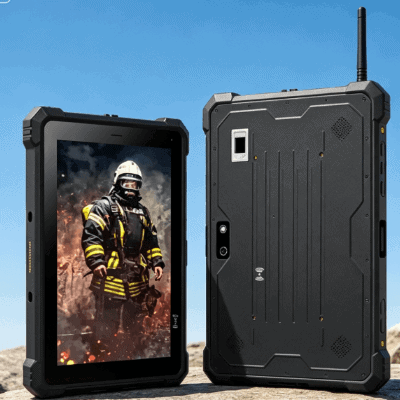
Selecting a mobile computer for an industrial environment is a fundamentally different process than buying a consumer device. While a consumer tablet focuses on aesthetics and peak processing speeds for media, a rugged tablet is an engineered tool designed to eliminate downtime in high-stakes environments.
For first-time buyers, the challenge lies in decoding technical specifications—like ingress protection and thermal tolerances—to ensure the hardware survives the specific rigors of your facility or field site. This guide breaks down the essential criteria for selecting a platform that balances performance with long-term reliability.

Understanding the Spectrum of “Ruggedness”
The term “rugged” is often used loosely in marketing. To make an informed decision, you must distinguish between three primary tiers of hardware durability:
- Commercial-Grade with a Case: These are standard consumer tablets housed in protective shells. They are unsuitable for industrial use as they lack internal component reinforcement and thermal management.
- Semi-Rugged: Designed for “prosumer” environments. They can handle minor drops and occasional moisture but usually lack the sealed ports required for heavy dust or rain.
- Fully Rugged: Built from the ground up with magnesium alloy chassis and shock-mounted components. These devices, such as the fully rugged Windows tablets found in industrial catalogs, are designed to withstand 4-foot drops onto concrete and continuous vibration in vehicle mounts.
Critical Specifications: IP Ratings and MIL-STD-810
When evaluating a rugged tablet buying guide, two certifications serve as the industry’s “gold standard” for reliability.
The IP (Ingress Protection) Rating
The IP rating consists of two digits. The first (0–6) measures protection against solids like dust; the second (0–9) measures protection against liquids.
- IP65: Dust-tight and protected against water jets. Ideal for most manufacturing floors.
- IP67: Dust-tight and can be submerged in up to 1 meter of water for 30 minutes. Essential for outdoor field services or marine applications.
MIL-STD-810G/H
This is a U.S. Military Standard that tests equipment limits. A truly rugged device should be tested for:
- Vibration: Critical if the tablet will be mounted on a forklift or in a service truck.
- Thermal Shock: The ability to move from a cold storage warehouse (-20°C) to a loading dock (30°C) without internal condensation or screen failure.
- Drop Resistance: Usually verified by 26 drops from a height of 4 to 6 feet.
Operating System Selection: Windows vs. Android
The choice between Windows and Android is rarely about personal preference; it is about your existing software infrastructure and security protocols.
| Feature | Rugged Windows Tablets | Rugged Android Tablets |
| Legacy Software | Native support for ERP/SAP desktop clients. | Requires web-based or mobile-specific apps. |
| Security | Robust integration with Active Directory/IT policies. | Uses Android Enterprise Recommended (AER) standards. |
| Customization | Higher overhead; powerful multitasking. | Lightweight; easier to “lock down” into Kiosk mode. |
| Hardware Cost | Typically higher due to licensing and Intel CPUs. | Generally more cost-effective for large deployments. |
For many industrial manufacturing roles, Windows remains the standard because it allows engineers to run the exact same diagnostic or CAD software on the tablet as they do on their workstations.

Display Technology and Field Visibility
A common failure point for first-time buyers is ignoring screen “nits” (a measure of brightness). A standard office tablet usually offers 300–400 nits. In direct sunlight, this becomes a mirror.
- Sunlight Readability: Look for displays with at least 800 to 1,000 nits.
- Optical Bonding: This manufacturing process eliminates the air gap between the touch layer and the LCD, reducing internal reflections and improving physical impact resistance.
- Glove/Wet Touch: Industrial screens must use specialized digitizers. If your operators wear 5mil nitrile or heavy work gloves, the screen must support a “Glove Mode” to maintain capacitive sensitivity.
Battery Logistics and Power Management
In a 24/7 manufacturing or logistics environment, a tablet is only useful if it stays powered. Consumer tablets require a plug-in charge, which creates downtime.
Look for Hot-Swappable Batteries. This feature allows an operator to pull a depleted battery and click in a fully charged one without shutting the device down. This is enabled by a small internal “bridge battery” that maintains power for 1–3 minutes during the swap. For multi-shift operations, this is a non-negotiable requirement.
Data Capture and I/O Requirements
Unlike consumer devices that rely on Bluetooth dongles, industrial tablets integrate data capture tools directly into the chassis. When reviewing your project requirements, consider:
- Integrated Barcode Scanners: Dedicated 1D/2D hardware engines (like Zebra or Honeywell modules) are significantly faster and more accurate than using the tablet’s rear camera.
- NFC/RFID: Essential for asset tracking and secure personnel login.
- Custom I/O: Do you need a physical RS232 (Serial) port for legacy machine diagnostics? Or an RJ45 Ethernet port for secure hardwired networking? High-quality rugged tablet manufacturers often offer modular “expansion backs” to accommodate these specific needs.
Long-term ROI vs. Initial Purchase Price
First-time buyers are often startled by the price delta between a $500 consumer tablet and a $1,500 rugged tablet. However, the Total Cost of Ownership (TCO) tells a different story.
- Failure Rates: Consumer tablets in industrial settings often see failure rates of 30% per year. Rugged tablets typically see less than 4%.
- Lifecycle Stability: A consumer model is discontinued every 12 months. This forces IT departments to constantly re-verify new hardware and buy new accessories. Industrial tablets typically have a 3-to-5-year lifecycle, meaning you can buy the exact same model three years from now to expand your fleet.
- Downtime Costs: If a tablet fails in a warehouse, the operator is idle. The cost of one hour of lost productivity often exceeds the price difference of the hardware.
Final Selection Strategy
Before finalizing a purchase, we recommend a “pilot phase.” Deploy 2–3 units in the actual work environment. Monitor how the battery holds up during a full shift and check if the Wi-Fi roaming is seamless as the operator moves between access points.
For those managing fleet deployments, focus on the ecosystem: does the manufacturer offer vehicle cradles, multi-bay battery chargers, and specialized hand straps? A tablet without the right mounting hardware is a liability in the field.

FAQ
Q: Can’t I just put a standard tablet in a “rugged” case?
A: While a case protects against scratches and minor bumps, it does not address internal vibration, thermal management, or port durability. Consumer tablets often overheat inside rugged cases because the case acts as an insulator, trapping heat.
Q: What is the difference between IP65 and IP67 for a tablet?
A: IP65 is “water-resistant” (protected against nozzles and rain). IP67 is “waterproof” (can be dropped into a puddle or tank). For indoor manufacturing, IP65 is usually sufficient. For outdoor field work in the UK or Pacific Northwest, IP67 is recommended.
Q: How long do rugged tablets usually last in an industrial environment?
A: With proper care, a fully rugged tablet has an operational lifespan of 5 to 7 years. Most organizations cycle them every 4 years to keep up with OS software requirements.
Q: Are rugged tablets significantly heavier than standard ones?
A: Yes. Because of the magnesium alloy frames and reinforced glass, a 10-inch rugged tablet typically weighs between 1.1kg and 1.5kg (2.4 to 3.3 lbs), which is roughly double the weight of a standard iPad.
Reference Sources
- IEC 60529: The international standard for Ingress Protection (IP) Ratings.
- MIL-STD-810H: Department of Defense Test Method Standard for Environmental Engineering Considerations.
- IEEE Xplore: Research on the reliability of mobile computing in hazardous environments.
- VDC Research: Industry reports on the Total Cost of Ownership (TCO) of rugged vs. consumer mobile devices.