

Industrial Mini PC Selection Guide: 6 Critical Engineering Factors

Selecting the Right Compute Node for Modern Industrial Automation
The transition from traditional, bulky rackmount servers to compact edge computing has redefined factory floor layouts. However, selecting an industrial mini PC for automation is not a matter of comparing CPU benchmarks. In a manufacturing environment, a “fast” computer that throttles due to heat or fails because of electromagnetic interference (EMI) is a liability, not an asset.
When engineers evaluate hardware, they are solving for reliability in “non-permissive” environments. This guide breaks down the technical requirements and manufacturing logic required to choose a mini PC that survives the rigors of the industrial lifecycle.
Thermal Management: The Fanless Imperative
In the consumer world, fans are a standard cooling solution. In automation, a fan is a single point of failure. It sucks in airborne particulates—oil mist, dust, and metallic shavings—which eventually coat internal components, causing thermal runaway or short circuits.
Passive Cooling Design
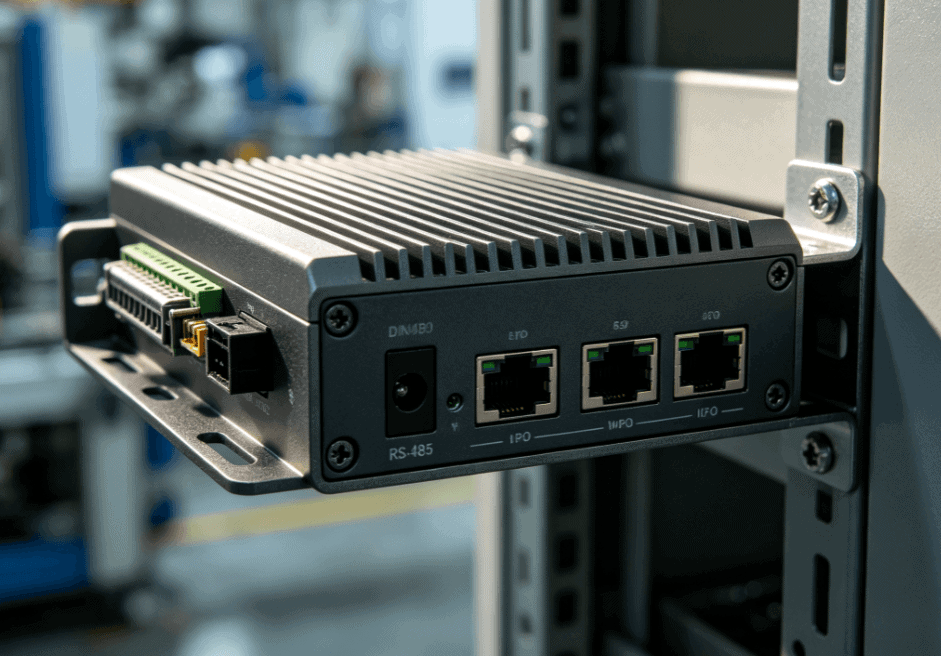
An effective industrial mini PC uses its chassis as a heat sink. High-quality units, such as those featured on Industrial-TabletPC, utilize extruded aluminum fins to maximize surface area. This passive convection cooling allows for a totally sealed enclosure (IP-rated), preventing internal contamination.
- Engineering Check: Look for “Fanless Design” and check the thermal operating range. A standard automation PC should support at least -10°C to 60°C, though specialized units can reach -20°C to 70°C.
I/O Density and Legacy Support
Automation projects often require communication between modern ERP systems and legacy factory floor equipment. Your industrial mini pc selection must account for “The Three Pillars of Connectivity”:
- Serial Communication: While USB is standard for peripherals, industrial sensors and PLCs still rely heavily on RS-232, RS-485, and RS-422. Ensure the hardware supports hardware-selectable serial modes via BIOS.
- GPIO (General Purpose Input/Output): For direct signaling to actuators or receiving triggers from proximity sensors without an intermediary PLC, isolated DIO/GPIO ports are essential to prevent voltage spikes from damaging the motherboard.
- Dual or Triple LAN: Network isolation is a security best practice. One LAN port connects to the internal machine network (OT), while the other connects to the corporate network (IT) or the cloud for data telemetry.
Comparison: Industrial vs. Consumer Mini PCs
| Feature | Consumer Mini PC (NUC) | Industrial Mini PC |
| Cooling | Active (Small high-RPM fan) | Passive (Fanless / Heat-sink chassis) |
| Input Voltage | Fixed 12V or 19V DC | Wide Voltage (9V ~ 36V DC) |
| Lifecycle | 12–24 months | 5–10 years |
| Mounting | Desktop / VESA | DIN-rail / Wall-mount / VESA |
| Component Grade | Commercial (Standard capacitors) | Industrial (Solid caps / High MTBF) |
Power Stability and Wide-Voltage Input
Factory power grids are notoriously “dirty.” The startup of large induction motors or heavy machinery causes voltage sags and surges. A standard 12V DC power brick will likely fail or cause system reboots in these conditions.
Professional-grade industrial mini PCs are designed with wide-voltage input (typically 9V to 36V DC). This allows the PC to be powered directly from the machine’s control cabinet power supply. Furthermore, look for over-voltage protection (OVP) and over-current protection (OCP) to safeguard the internal logic boards against electrical noise common in welding or CNC environments.
Vibration and Mechanical Resilience
In applications like AGVs (Automated Guided Vehicles) or CNC machine monitoring, the PC is subject to constant low-frequency vibration.
To ensure long-term stability:
- M.2 or mSATA Storage: Never use mechanical HDDs. Solid-state storage is mandatory.
- Cable-Free Internal Design: High-end industrial PCs minimize or eliminate internal ribbon cables. Components are connected via board-to-board connectors to prevent cables from shaking loose over time.
- Locking Connectors: Look for screw-lock DC jacks and DB9 connectors to prevent accidental disconnection due to machine movement.
The “Hidden” Lifecycle Cost: Availability
A common mistake in procurement is selecting a PC based on the lowest initial unit price. However, if that model is discontinued in 18 months, your engineering team must spend hundreds of man-hours re-validating a new hardware revision, updating software images, and changing mounting hardware.
True industrial hardware offers a “Long-Life Cycle” (often 5 to 7 years). This ensures that if a unit fails in the field five years from now, you can purchase an identical replacement, maintaining software consistency across your entire fleet of machines.
Deployment Strategy: Matching PC to Application
- Light Automation (Gateways/Data Logging): An Intel Celeron or J-series processor is sufficient. These offer ultra-low power consumption and minimal heat signature.
- Heavy Edge AI (Vision Inspection): If you are running real-time defect detection, look for units that support Core i5/i7 processors and have sufficient thermal mass to prevent CPU throttling during heavy computational loads.
- HMI Replacements: If the mini PC is intended to drive a display for an operator, ensure it supports the specific mounting needs of your enclosure, such as VESA or integrated panel mounting clips.
As seen in the specialized product lines at Industrial-TabletPC, the integration of ruggedized hardware with flexible mounting options (DIN-rail for cabinets, VESA for arms) is what separates a specialized automation tool from a generic office computer.
FAQ
Q: Can I use a standard NUC for industrial automation?
A: While possible for prototyping, it is not recommended for production. Standard NUCs use fans that fail in dusty environments and lack the wide-voltage input and serial ports (COM) required for industrial reliability.
Q: What is a Watchdog Timer (WDT) and why do I need it?
A: A WDT is a hardware-level timer that automatically reboots the Mini PC if the software hangs. This is critical for remote or headless automation sites where manual intervention is difficult.
Q: How do I mount a Mini PC inside a control cabinet?
A: Most industrial units support DIN-rail mounting, which allows the PC to snap onto the same rails used by PLCs and circuit breakers. Wall-mount brackets are also common for mounting to the side of a machine.
Q: What is the difference between RS-232 and RS-485 in mini PCs?
A: RS-232 is typically used for short-distance point-to-point communication (up to 15m), while RS-485 is designed for multi-point “daisy-chain” networks and can cover distances up to 1,200m, making it ideal for large-scale factory floor sensor arrays.
Reference Sources
- IEEE Xplore: Research on thermal management in fanless embedded systems. ieee.org
- International Electrotechnical Commission (IEC): IEC 60068-2 standards for environmental testing of electronic equipment (vibration, shock, and temperature). iec.ch
- ISO 9001: Quality management systems for electronics manufacturing. iso.org
- Intel Embedded Roadmap: Lifecycle documentation for “Tiger Lake” and “Elkhart Lake” industrial processors. intel.com