

Industrial Tablet Display Guide: Screen Types & Performance


Industrial Tablet Screen Types and Display Options Explained
Selecting an industrial tablet display is fundamentally different from choosing a consumer-grade device. In a manufacturing facility, a logistics warehouse, or an offshore oil rig, the “best” screen isn’t defined by pixel density or color gamut alone. Instead, performance is measured by thermal stability, glove-compatibility, and visibility under high-ambient light.
The display is the primary interface between the human operator and the machine control system. If the display fails due to condensation, impact, or glare, the entire workflow stops. Understanding the nuances of industrial display architecture is critical for engineers and project managers specifying hardware for rugged environments.

The Core Architecture: TFT-LCD in Industrial Contexts
Most industrial tablets utilize Thin-Film Transistor Liquid Crystal Display (TFT-LCD) technology. While OLED has gained traction in the consumer market, TFT-LCD remains the industry standard for rugged tablets due to its longevity, wide operating temperature range, and resistance to “burn-in”—a critical factor when displaying static HMI (Human-Machine Interface) dashboards for 24/7 shifts.
In an industrial tablet display, the backlight unit (BLU) is often upgraded. Standard tablets offer 200–300 nits of brightness. Industrial-grade panels, such as those integrated into high-performance rugged tablets, often start at 500 nits and can scale up to 1,000 nits or more for true sunlight readability.
Touch Interface Technologies: PCAP vs. Resistive
The choice of touch technology determines how the operator interacts with the software, especially in challenging environments.
1. Projected Capacitive (PCAP)
PCAP is the technology used in smartphones but hardened for industrial use. It supports multi-touch gestures and offers excellent clarity because it uses a glass cover lens.
- Best for: High-precision tasks, multi-touch applications, and environments where aesthetics and scratch resistance are priorities.
- Industrial Advantage: Modern industrial PCAP screens feature specialized controllers that allow for “Water Rejection” (preventing false touches from rain) and “Glove Mode” (adjusting sensitivity for latex or work gloves).
2. Resistive Touch
Resistive screens rely on pressure. Two conductive layers are pressed together to register a touch point.
- Best for: Heavy-duty industrial settings where operators wear thick, insulated gloves (e.g., cold storage or heavy welding).
- Industrial Advantage: It is immune to electromagnetic interference (EMI) and works with any pointing device—a finger, a stylus, or even a tool. However, it generally has lower light transmission compared to PCAP.

Enhancing Visibility: Optical Bonding vs. Air Bonding
A common failure point in industrial environments is “display washout” or internal fogging. This is dictated by how the display layers are assembled.
Air Bonding (Frame Bonding)
The touch panel is attached to the LCD using adhesive tape along the perimeter, leaving a small air gap between the layers.
- The Risk: In humid environments or areas with high temperature fluctuations, moisture can seep into the air gap, causing internal condensation. Furthermore, light reflects off every surface transition (Glass -> Air -> LCD), reducing contrast.
Optical Bonding
In this process, a clear optical-grade resin (LOCA or OCA) fills the gap between the LCD and the touch glass.
- The Benefit: It eliminates the internal reflection surfaces, significantly increasing the contrast ratio and sunlight readability. More importantly, it creates a “solid state” display that is more resistant to vibration and impact. For outdoor or high-vibration automotive applications, optical bonding is considered an essential specification.
Surface Treatments and Coatings
The outermost layer of an industrial tablet display often features chemical treatments to handle specific environmental challenges:
- Anti-Glare (AG): A microscopic “pitting” of the glass surface that diffuses reflected light. This is vital for indoor environments with bright overhead LED lighting that creates “hot spots” on the screen.
- Anti-Reflective (AR): A chemical coating that uses destructive interference to cancel out reflections. While it provides the best clarity, it can be more susceptible to fingerprints.
- Anti-Fingerprint (AF/Oleophobic): A coating that reduces the adhesion of oils from the skin, making the screen easier to clean and maintaining touch sensitivity over long shifts.
Durability Standards: IP Ratings and IK Impact Resistance
When evaluating an industrial tablet display, mechanical protection is quantified through two primary standards:
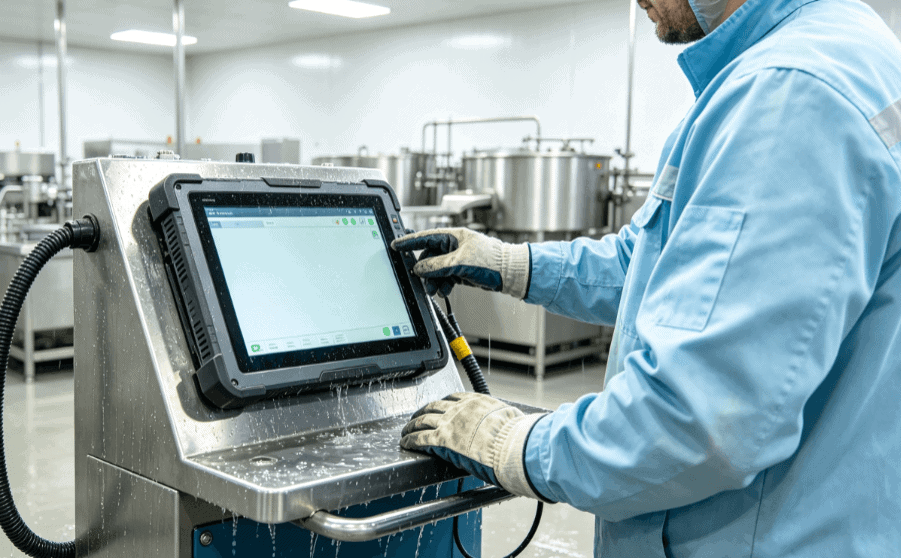
- IP Ratings (Ingress Protection): A tablet with an IP65 or IP67 rating ensures the display assembly is sealed against fine dust and water jets. This is critical for “wash-down” environments like food processing or medical facilities.
- IK Ratings: This measures the resistance against mechanical impact. An IK07 or IK08 rated display can withstand a direct strike without the cover glass shattering, protecting the operator from glass shards and keeping the machine operational.
Application-Specific Display Requirements
Different industries prioritize different display characteristics:
- Warehousing & Logistics: High-contrast displays are required to handle the transition from dark aisles to bright loading docks. Vibration resistance is key for vehicle-mounted tablets.
- Field Service & Utilities: High-nit (Sunlight Readable) displays and large batteries are prioritized, as the screen must compete with direct solar radiation.
- Manufacturing/HMI: Chemical resistance and longevity are paramount. The display must withstand exposure to industrial solvents and 24/7 operation without degradation.
- Medical Environments: Displays often require anti-microbial coatings and must remain functional when used with surgical gloves and cleaned with harsh disinfectants.
Final Considerations for Procurement
When reviewing specifications on platforms like Industrial-TabletPC, look beyond the screen size. Analyze the “Nits” rating for your specific lighting environment, the touch technology for your operators’ PPE (Personal Protective Equipment), and the bonding method if your facility experiences temperature swings.
Choosing the right display is an investment in uptime. While a standard consumer screen might work in an office, an industrial tablet display is engineered to be a reliable tool in the most demanding conditions on earth.
FAQ
What are “Nits” and how many do I need for an industrial tablet?
Nits are a measurement of luminance (brightness). For indoor factory use, 300–500 nits are usually sufficient. For outdoor use or areas with high window glare, you should look for “High Brightness” displays offering 800 to 1,000+ nits to ensure readability.
Can I use a PCAP (Capacitive) touch screen with heavy work gloves?
Standard PCAP screens struggle with thick gloves. However, industrial-grade PCAP tablets include specialized firmware and high-sensitivity controllers that can be toggled into “Glove Mode” to work with various materials, including leather and heavy rubber.
Why is optical bonding better than air bonding for rugged tablets?
Optical bonding eliminates the air gap between the LCD and the glass. This prevents internal condensation (fogging), improves impact resistance, and enhances sunlight readability by reducing internal light reflections.
What does “Sunlight Readable” actually mean?
It is a combination of high-brightness backlighting (usually >800 nits) and surface treatments like Anti-Reflective coatings. A sunlight-readable display ensures that the screen brightness exceeds the ambient light reflecting off the glass, maintaining a visible contrast ratio.
Are industrial tablet screens shatterproof?
While no glass is entirely unbreakable, industrial displays use chemically strengthened glass (like Gorilla Glass) and often carry IK ratings (e.g., IK07). These are designed to withstand significant impact and, if they do break, are often held together by optical bonding layers to prevent dangerous shards.
Reference Sources
- IEC 60529: Degrees of protection provided by enclosures (IP Code). Official IEC Standards.
- IEEE Xplore: Research on “Optical Bonding Performance in Harsh Environments.” IEEE Digital Library.
- MIL-STD-810H: Department of Defense Test Method Standard for Environmental Engineering.
- ASTM D3359: Standard Test Methods for Rating Adhesion by Tape Test (used for display coatings). ASTM International.
- SID (Society for Information Display): Technical papers on TFT-LCD and PCAP integration. SID Publications.