
Industrial Android PDA Manufacturer: What B2B Buyers Should Evaluate


Choosing an industrial Android PDA manufacturer requires evaluating more than processor specifications and unit prices. B2B buyers should examine barcode scanning reliability, Android software support, device durability, manufacturing quality control, OEM customization, delivery capacity, and after-sales service. A suitable manufacturer should provide hardware that works with the buyer’s warehouse or field applications and remains serviceable throughout the expected deployment lifecycle.
For distributors, system integrators, and enterprises purchasing handheld computers in volume, small differences in product configuration can create significant operating costs. An incompatible scanning engine, unstable Wi-Fi connection, or discontinued firmware version may affect an entire device fleet.
The most effective sourcing process starts with the intended application, then evaluates the manufacturer’s technical and commercial capabilities against measurable requirements.
What Is an Industrial Android PDA?
An industrial Android PDA is a rugged handheld computer that runs Android and supports mobile data collection, business applications, and wireless communication.
Unlike a conventional consumer smartphone, an industrial PDA is typically designed for workflows involving barcode scanning, inventory management, logistics, manufacturing, and field service.
Depending on the model, it may include dedicated scanning hardware, physical scan triggers, removable batteries, NFC, industrial wireless connectivity, and reinforced protection against environmental exposure.
Industrial PDA vs. Consumer Smartphone
| Evaluation Factor | Industrial Android PDA | Consumer Smartphone |
|---|---|---|
| Primary use | Enterprise data collection | General communication and applications |
| Barcode scanning | Dedicated engine on supported models | Usually camera-based |
| Physical controls | May include scan triggers or keypads | Primarily touchscreen |
| Durability | Model-specific industrial protection | Varies by consumer model |
| Accessories | Charging cradles, grips and batteries where available | General-purpose accessories |
| Software integration | May provide scanner SDKs and enterprise interfaces | Standard mobile application interfaces |
| Lifecycle planning | Often evaluated for fleet deployment | Consumer product replacement cycles |
An industrial designation does not guarantee that every device includes these features.
Buyers should verify the exact hardware configuration and available accessories before comparing quotations.
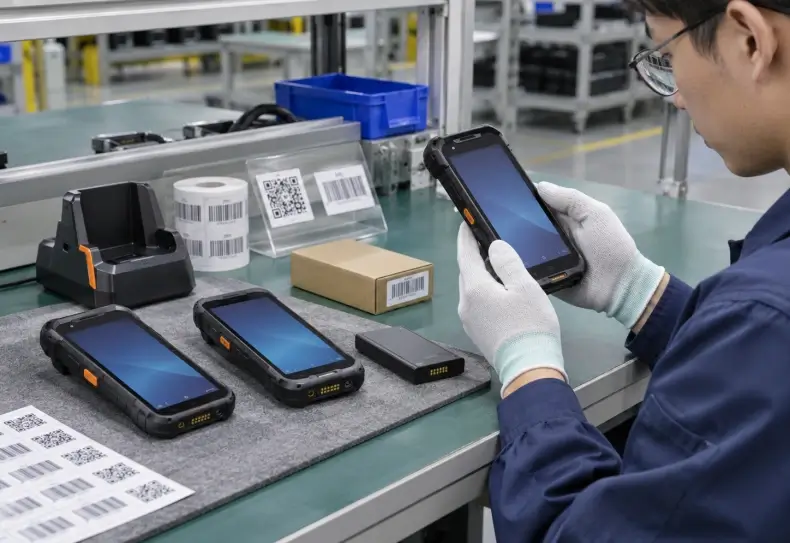
1. Evaluate Barcode Scanning Performance Before CPU Specifications
For warehouse and logistics applications, barcode capture often has a greater impact on productivity than small differences in processor speed.
An employee may scan hundreds of labels during receiving, picking, and shipment verification. Repeated failed scans interrupt the workflow even when the application itself performs quickly.
Choose the Right 1D or 2D Scanning Engine
Common 1D barcodes include Code 128, EAN, UPC, and Interleaved 2 of 5.
Two-dimensional formats include QR Code, Data Matrix, and PDF417.
Many modern 2D imaging engines also support common 1D barcodes.
However, buyers should confirm compatibility with their actual symbologies instead of relying on the phrase “2D barcode scanner.”
Important specifications include:
- Supported barcode symbologies.
- Minimum readable barcode element size.
- Near and far working distances.
- First-pass reading performance.
- Performance on damaged or reflective labels.
- Scanner SDK and application interface.
- Aiming visibility and trigger responsiveness.
For high-rack warehouses, an extended-range engine may be necessary. Employees scanning small labels at close range may require a different optical configuration.
A long maximum reading distance is not automatically better for every application.
Compare Real-World Decoding, Not Marketing Claims
A manufacturer’s specification may describe performance with ideal labels under controlled conditions.
Warehouse environments include shrink-wrapped pallets, damaged carton labels, reflective packaging, and poor lighting.
Ask suppliers to demonstrate barcode reading using representative samples from the intended operation.
Record first-pass read success, decoding time, and the number of operator repositioning attempts.
Seaview’s R366-S Android handheld terminal lists an optional 2D scanning engine. Buyers should confirm the exact scan module and its decoding specifications for their intended configuration.
2. Check Android Version, Security Updates and WMS Compatibility
An Android PDA operates as part of a business software environment.
The operating system must support the customer’s warehouse management system (WMS), enterprise resource planning (ERP) application, or field service software.
Android Version Is Only the Starting Point
A supplier may advertise Android 13 or another operating system version.
That information is useful, but it does not establish how long the manufacturer will provide security patches, firmware updates, or technical support.
Buyers should request:
- Current Android version and build.
- Security patch level.
- Firmware update policy.
- Expected software support period.
- Availability of enterprise enrollment options.
- Compatibility with the required MDM or UEM platform.
- Application testing and recovery procedures.
For long-term projects, the software support agreement can be as important as the initial hardware specification.
Scanner SDK and Application Integration
Some handheld applications accept barcode data as keyboard input.
Others require direct integration through a manufacturer-supported scanner SDK.
The appropriate method depends on the business software and its need for scanner controls, error handling, and data validation.
A good supplier should explain which interfaces are available and provide relevant developer documentation when supported.
For more detail on enterprise application deployment, the Android handheld terminal MDM deployment guide covers device enrollment, software updates, and application compatibility.
Test the Complete WMS Transaction
Reading a barcode successfully does not mean the WMS has accepted the transaction.
The application must validate the captured information and communicate with the backend system.
For example, receiving operations may require:
- Scanning the shipment identifier.
- Retrieving the expected purchase order.
- Confirming the product and quantity.
- Recording discrepancies.
- Submitting the receiving transaction.
- Receiving confirmation from the WMS.
The complete workflow should be tested before purchasing a large device fleet.
3. Examine Industrial Durability and Battery Performance
An industrial PDA may be exposed to dust, drops, vibration, and temperature changes during daily operation.
However, ruggedness must be assessed through documented specifications.
IP Ratings and Drop Resistance
An IP rating describes protection against solid particles and water ingress under defined test conditions.
For example, IP65 and IP67 indicate different levels of water protection.
These ratings do not establish overall resistance to every impact, chemical, or temperature condition.
Buyers should verify the device’s stated drop resistance separately.
If the terminal will operate outdoors or in a cold-storage warehouse, request the applicable temperature specifications and validation reports.
Battery Capacity and Shift Requirements
Battery capacity is important, but milliampere-hours alone do not establish runtime.
Actual operating time depends on the display, scanning engine, wireless communication, processor workload, and ambient temperature.
A useful battery test should reproduce a representative working shift.
Where battery replacement matters, confirm whether the battery is removable or genuinely hot-swappable.
These are different capabilities.
A removable battery may require a complete device shutdown before replacement.
Ergonomics and Accessories
Warehouse operators may carry and operate handheld devices throughout an entire shift.
Device weight, grip shape, scan-trigger location, and screen accessibility influence comfort and productivity.
Ask the manufacturer about compatible accessories, such as:
- Charging cradles.
- Spare batteries.
- Hand straps.
- Pistol grips.
- Protective cases.
- Vehicle charging accessories.
Only include accessories in the purchasing specification after confirming that they are available for the selected model.
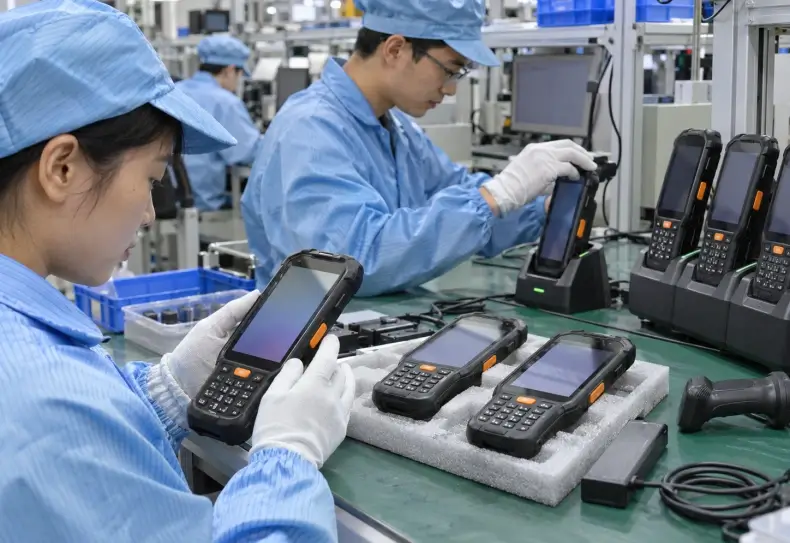
4. Verify the Manufacturer’s Actual Production Capabilities
When searching for an industrial Android PDA manufacturer, buyers often encounter manufacturers, OEM suppliers, ODM developers, trading companies, and distributors.
These businesses can serve different purchasing requirements.
The company offering the lowest quotation is not necessarily responsible for product design or manufacturing.
Manufacturer vs. Supplier vs. ODM Partner
| Supplier Type | Typical Role | What Buyers Should Verify |
|---|---|---|
| Manufacturer | Produces or assembles devices | Production process and quality controls |
| OEM supplier | Supplies products under agreed branding or specifications | Branding options and configuration limits |
| ODM partner | Supports product design or engineering development | Engineering resources and design ownership |
| Distributor | Resells finished products | Product authenticity and warranty handling |
| Trading company | Coordinates sourcing and export | Actual production source and support responsibility |
These categories may overlap.
For example, a manufacturer may also provide OEM and ODM services.
The important question is which organization controls product design, production, testing, firmware, and after-sales support.
Manufacturing Capability Checklist
Before placing a volume order, ask the supplier to explain:
- Which production stages it performs directly.
- Where final assembly and testing take place.
- How critical components are sourced.
- Whether the hardware configuration remains consistent between batches.
- How production changes are documented.
- Whether firmware versions are controlled by batch.
- How defective devices are identified and handled.
- Which engineering changes require customer approval.
For OEM or ODM projects, establish responsibility for firmware modifications, mechanical design, accessories, and certification work.
A manufacturer should be able to distinguish standard product configurations from custom development requests.
5. Quality Control: What Evidence Should Buyers Request?
A professional product brochure is not sufficient evidence of manufacturing quality.
Buyers should request records that connect quality claims to the actual product model and production process.
Incoming, Assembly and Final Testing
A suitable quality process may include incoming component checks, assembly inspections, functional testing, and final quality verification.
For an Android PDA, functional testing should cover the relevant subsystems:
| Test Area | What to Check |
|---|---|
| Display and touchscreen | Touch accuracy and responsiveness |
| Barcode engine | Supported codes and decoding consistency |
| Wi-Fi and cellular | Connection stability and regional bands |
| Battery and charging | Charging behavior and power stability |
| Buttons and triggers | Mechanical operation and reliability |
| USB and accessories | Interface compatibility |
| Cameras and NFC | Functionality where included |
| Firmware | Correct build and configuration |
| Device identity | Serial number and configuration traceability |
Not every manufacturer uses identical test procedures.
Ask for a sample inspection checklist and confirm which tests apply to the purchased configuration.
Certification and Regulatory Documentation
Common technical and regulatory considerations may include:
- IEC 60529 for ingress protection testing.
- IEC 62368-1 for relevant electrical product safety requirements.
- Applicable CE and UKCA requirements for the destination market.
- FCC equipment authorization where applicable.
- RoHS substance restrictions.
- UN 38.3 lithium battery transport test documentation.
- ISO 9001 quality management certification, where held.
These requirements are not interchangeable.
For example, ISO 9001 concerns an organization’s quality management system; it is not a certification proving that a particular handheld withstands a specified drop.
Regulatory obligations also depend on the product configuration, radio modules, and destination market.
Buyers should verify the scope and validity of each document rather than accepting an unsupported certification list.
6. OEM and ODM Customization for Industrial PDA Projects
OEM and ODM capabilities can matter when a distributor or system integrator needs equipment adapted to a specific market.
However, customization should solve a real deployment problem.
It may increase development costs, minimum order quantities, and production lead times.
Common Customization Requirements
Projects may request:
- Branding and packaging changes.
- Selected scanning engine configurations.
- Different memory or storage options.
- Regional wireless configurations.
- Preinstalled business applications.
- Device enrollment or provisioning.
- Mechanical accessories.
- Customized firmware or system settings.
Availability depends on the manufacturer’s platform and engineering capability.
A standard option listed on a datasheet is different from a custom feature requiring development.
Before agreeing to customization, buyers should clarify engineering fees, sample approval, minimum quantities, and ownership of custom software or tooling.
Questions for OEM or ODM Suppliers
Ask the supplier to provide a written answer to the following:
- Which changes are supported by existing hardware?
- Which changes require a new PCB, enclosure, or firmware build?
- Who performs software testing?
- Who owns the modified software and technical documentation?
- Will changes affect regulatory approvals?
- What happens if a component becomes unavailable?
- Can replacement parts be supplied after the initial order?
Clear answers help prevent disputes after prototype approval.
7. Compare Industrial Android PDA Product Configurations
A manufacturer should offer product configurations aligned with the intended workload.
Seaview’s industrial handheld terminals product category includes RS50, R366-S, RS51, RS53, and R355-M.
Two models offer useful starting points for comparison.
RS50: Connected Industrial Handheld Operations
The RS50 rugged Android handheld terminal lists Android 13/Harmony OS configuration options, a 6.3-inch display, a detachable 5000mAh battery, and an IP67 rating.
Its published specifications also list optional 2D scanning, NFC, and fingerprint functions.
For buyers, the key issue is determining which options are included in the selected commercial configuration.
The advertised 5G capability should also be checked against regional carrier bands and certification requirements.
R366-S: General Warehouse and Field Data Collection
The R366-S lists Android 13, a Qualcomm SM6225 processor, a 5.5-inch display, and a detachable 4600mAh battery.
Its optional 2D scanning engine makes it relevant for evaluating barcode-based inventory applications.
The available charging cradle option may also be useful for spare-battery planning.
However, the scanner model, accessory package, and application compatibility should be confirmed before deployment.
How to Shortlist Product Models
| Evaluation Requirement | RS50 | R366-S |
|---|---|---|
| Published OS | Android 13/Harmony OS options | Android 13 |
| Display | 6.3 inches | 5.5 inches |
| Published battery | 5000mAh detachable | 4600mAh detachable |
| 2D scanning | Optional | Optional |
| NFC | Optional | Optional |
| Published 5G capability | Yes | Not specified |
| Suitable evaluation focus | Connected field and mobile workflows | General warehouse data collection |
These are product-page specifications, not independently verified performance comparisons.
The final selection should depend on hardware configuration, software compatibility, testing, and commercial requirements.
For broader operational criteria, the warehouse rugged handheld terminal selection guide explains scanning, wireless connectivity, battery life, and ergonomic considerations.
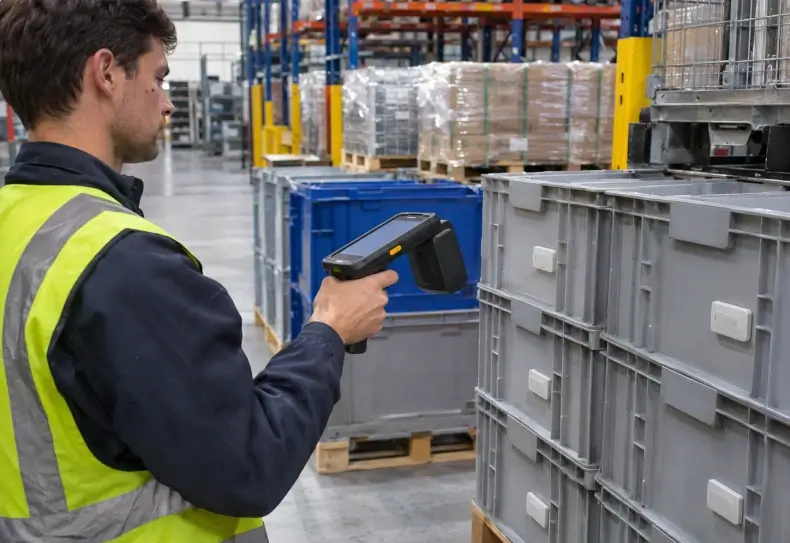
8. Compare Supplier Quotes by Total Cost of Ownership
Industrial PDA quotations should not be compared on unit price alone.
The total cost of ownership includes acquisition, deployment, accessories, software integration, maintenance, and replacement.
What Affects the Final Purchasing Cost?
Important factors include:
- Order quantity and configuration.
- Scan engine and wireless modules.
- Battery and charging accessories.
- OEM branding requirements.
- Firmware or application customization.
- Product testing and certification needs.
- Shipping and import costs.
- Warranty terms.
- Spare parts and repair support.
A lower hardware price may become less attractive if the device requires expensive custom application work or causes frequent operational interruptions.
Example of a Three-Year Cost Model
A simple procurement model can use:
Three-Year TCO = Hardware + Accessories + Integration + Support + Expected Downtime + Replacement Costs
For example, if a warehouse deploys 100 devices, a small per-device maintenance difference can become significant across the entire fleet.
The organization should use its own labor costs, failure assumptions, and operating hours rather than relying on generic savings claims.
What Should Be Included in an RFQ?
A request for quotation should define:
- Target quantity and delivery schedule.
- Required Android version.
- Barcode types and scanning distances.
- Wireless frequency bands.
- Battery and accessory requirements.
- Environmental conditions.
- WMS or application compatibility.
- OEM customization requirements.
- Required compliance documents.
- Warranty and repair expectations.
A structured RFQ makes supplier quotations easier to compare.
It also reduces the risk of receiving an attractive price for an unsuitable configuration.
9. How to Evaluate a PDA Manufacturer Before a Bulk Order
The most reliable procurement process combines technical screening with a practical pilot.
Step 1: Review Supplier Documentation
Request the company profile, product datasheets, relevant test reports, warranty terms, and manufacturing information.
Confirm which organization provides engineering support and handles warranty claims.
Step 2: Obtain Evaluation Samples
Select a configuration that matches the intended commercial order.
A sample with a different scanner or operating system may produce misleading test results.
Step 3: Run Real Workflow Tests
Test receiving, picking, barcode decoding, Wi-Fi roaming, battery endurance, and application recovery using representative employees.
Record first-pass scan success and transaction completion time.
Step 4: Verify Production Consistency
Before volume production, approve the final hardware configuration, firmware build, and accessory package.
Agree on inspection criteria and how changes will be communicated.
Step 5: Confirm Delivery and After-Sales Support
Review lead times, spare-battery supply, repair procedures, firmware support, and warranty exclusions.
A supplier should explain how customers obtain replacement parts and technical assistance after deployment.
For international orders, clarify shipping responsibilities and the documents required for customs clearance.
Conclusion
Choosing an industrial Android PDA manufacturer requires balancing hardware capability, software compatibility, manufacturing quality, and long-term service.
Barcode scanning performance and wireless reliability determine whether employees can complete daily tasks efficiently. Android lifecycle support and SDK compatibility influence integration costs. Quality control and after-sales arrangements affect the reliability of a large deployment.
B2B buyers should compare actual product configurations, request technical documentation, and conduct controlled testing before placing volume orders.
The strongest supplier relationship is built on measurable specifications, consistent production, and clear responsibility for support throughout the device lifecycle.
FAQ
How do I choose a reliable industrial Android PDA manufacturer?
Evaluate manufacturing capability, barcode scanning performance, Android software support, quality testing, OEM options, production consistency, and after-sales service. Test representative samples before committing to a bulk order.
What is the difference between an Android PDA and a consumer smartphone?
An industrial Android PDA is designed for professional data collection and may include dedicated scan engines, rugged protection, physical scan buttons, enterprise accessories, and specialized software interfaces.
What certifications should an industrial PDA manufacturer provide?
Request applicable product safety, radio, environmental, and battery transport documentation for the target market. Verify any claimed ISO 9001 certification and confirm that test reports cover the exact device configuration.
Can an Android PDA manufacturer provide OEM or ODM customization?
Some suppliers offer branding, hardware options, firmware changes, and accessories. Buyers should confirm the supplier’s actual engineering capability, development cost, minimum order quantity, and approval process.
What should B2B buyers test before purchasing industrial PDAs in bulk?
Test barcode decoding, WMS integration, Wi-Fi roaming, battery endurance, device durability, accessory compatibility, application stability, and recovery from network interruptions.
Looking for an Industrial Android PDA for Your Business?
Choosing the right handheld terminal starts with your barcode scanning, connectivity, application, and deployment requirements. Explore Seaview’s Android handheld devices and discuss available hardware configurations, OEM options, and project specifications with our team.