

7 Essential Industrial Tablet Features for Demanding Environments

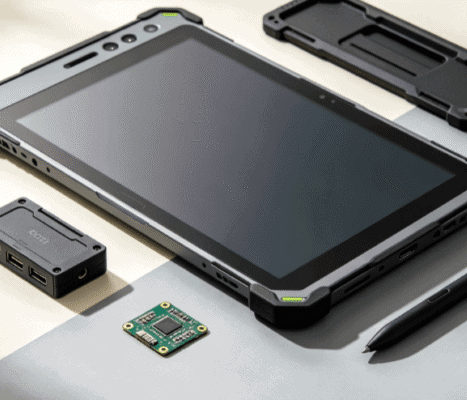
Selecting hardware for a factory floor, a construction site, or a remote oil rig requires a departure from consumer-grade logic. While a standard tablet prioritizes aesthetics and slimness, an industrial tablet is a tool designed for uptime in environments that would destroy high-street electronics within hours.
Understanding the specific features of an industrial tablet PC is essential for project managers and engineers who need to balance performance with long-term reliability. This guide breaks down the core technical specifications that define professional-grade rugged mobile computing.

Environmental Durability: Beyond the Rugged Shell
The most visible industrial tablet feature is its chassis, but true durability is measured by standardized certifications. Two primary benchmarks define how much abuse a tablet can withstand.
- Ingress Protection (IP) Ratings: This defines the device’s resistance to solids and liquids. For most industrial applications, IP65 (dust-tight and protected against water jets) is the baseline. In more extreme cases, such as food processing where equipment is hosed down, IP67 (submersion up to 1 meter) or IP69K (high-pressure steam cleaning) becomes necessary.
- MIL-STD-810G/H: This is a U.S. Military Standard that subjects hardware to a battery of tests, including vibration, functional shock, salt fog, and extreme temperature cycles. A tablet meeting MIL-STD-810H standards is typically capable of surviving repeated 4-foot drops onto concrete, which is the most common cause of device failure in logistics and warehousing.
Specialized Display Technology for Field Use
In an industrial context, the screen is often the most vulnerable component and the most critical interface. Standard screens fail under direct sunlight or when handled with wet fingers.
High-Brightness (Sunlight Readable) Panels
Standard consumer tablets offer 300–400 nits of brightness. Industrial units often feature 1,000+ nits with optical bonding. Optical bonding eliminates the air gap between the glass and the LCD, reducing internal reflections and significantly improving contrast in high-ambient-light environments like open-pit mines or maritime decks.
Advanced Touch Modes
A tablet used in a cold-chain warehouse or a chemical plant must respond to more than just a bare fingertip. Essential industrial touch features include:
- Glove Mode: Increases sensitivity to register inputs through thick work gloves.
- Rain/Wet Mode: Uses specialized firmware logic to distinguish between a deliberate finger press and a stray raindrop or splash.
- Active Stylus Support: For precise signatures or CAD drawing annotations in the field.
Industrial-Grade Connectivity and I/O Ports
Consumer tablets rely almost exclusively on USB-C and wireless protocols. In contrast, industrial workflows often require physical connections to legacy machinery and specialized peripherals.
| Feature | Industrial Requirement | Benefit |
| Legacy Ports | RS232, RS485, DB9 | Direct communication with PLCs and CNC machines. |
| Ethernet | RJ45 (often M12 connectors) | Secure, high-speed wired networking for diagnostic tasks. |
| Modular Expansion | Pogo Pins / Expansion Backs | Allows for integrated barcode scanners, RFID readers, or CAC card readers. |
| Dedicated GNSS | U-blox or similar modules | High-precision GPS/GLONASS/Galileo for surveying and fleet tracking. |
Thermal Management and Fanless Design
Thermal throttling is a significant risk when tablets are used in high-temperature environments or mounted in vehicle cabs without airflow. Most high-quality industrial tablets utilize fanless cooling systems.
By using magnesium alloy heat sinks and heat pipes, these devices dissipate heat through the chassis itself. This design is critical for two reasons:
- Mechanical Reliability: No moving parts (fans) mean one less point of failure.
- Contaminant Protection: A fanless design allows for a fully sealed chassis, preventing metallic dust or moisture from being sucked into the internal circuitry.

Battery Architecture: Hot-Swapping for 24/7 Operations
In multi-shift environments, a tablet that needs to sit on a charger for three hours is a bottleneck. Industrial tablets solve this through hot-swappable battery systems.
A small internal bridge battery provides 3–5 minutes of reserve power, allowing the operator to swap the main depleted battery for a fresh one without shutting down the OS or losing unsaved data. This feature is indispensable for emergency services and continuous manufacturing lines where downtime is not an option.
Long-Term Lifecycle and Support
Perhaps the most overlooked industrial tablet feature is the product lifecycle. Consumer tablets are refreshed every 12–18 months, making it impossible for an enterprise to maintain a standardized fleet.
Industrial manufacturers typically guarantee a 3-to-5-year production lifecycle and an additional 3 years of repair support. For an OEM project manager, this means that if you certify a specific tablet for your medical device or vehicle mount today, you can buy the exact same hardware configuration three years from now, avoiding the high costs of re-testing and software re-certification.
Security and Mounting Capabilities
Data security in the field requires more than just a passcode. Look for tablets integrated with TPM 2.0 (Trusted Platform Module) for hardware-based encryption. Additionally, physical security is handled through specialized mounting systems.
Unlike flimsy car phone holders, industrial tablets utilize VESA or RAM mount standards. These docks often include “port replication,” allowing the tablet to connect to an external antenna, power supply, and peripherals the moment it is clicked into the vehicle or workstation cradle.
Choosing Based on Application
The “ideal” feature set depends entirely on your operational context:
- Logistics/Warehousing: Prioritize integrated 1D/2D barcode scanners and 4-foot drop protection.
- Hazardous Environments (Oil & Gas): Look for ATEX or C1D2 (Class 1 Division 2) certifications to ensure the device won’t spark an explosion.
- Manufacturing: Focus on physical I/O (RS232/RJ45) and fanless thermal management to resist airborne particulates.
When evaluating options, such as those found on Industrial-TabletPC’s product listings, it is vital to match the IP rating and processing power (Intel Core vs. ARM) to your specific software requirements. A high-performance Windows-based rugged tablet might be necessary for complex CAD viewing, while an Android-based handheld might be more efficient for simple inventory management.

FAQ
Q: Is a “ruggedized” case the same as an industrial tablet?
A: No. A consumer tablet in a rugged case still lacks the thermal management, high-brightness display, industrial I/O ports, and long-term lifecycle support of a purpose-built industrial PC. The internal components of a consumer tablet are not designed to withstand the constant vibration or temperature fluctuations of an industrial setting.
Q: What does “Optically Bonded” mean for a tablet screen?
A: Optical bonding is a process where a layer of resin is applied between the touch screen glass and the LCD panel. This eliminates the air gap, which improves sunlight readability by 400%, increases durability, and prevents internal condensation in humid environments.
Q: Can I run standard Windows software on an industrial tablet?
A: Yes, most professional industrial tablets use standard Windows 10/11 Pro or IoT Enterprise editions, allowing them to run the exact same .exe applications used on desktop workstations.
Q: Why are industrial tablets heavier than consumer tablets?
A: The extra weight usually comes from internal magnesium alloy mid-frames (for structural rigidity), larger heat sinks (for fanless cooling), and higher-capacity batteries designed for long shifts
Reference Sources
- IEC 60529: The international standard for Ingress Protection (IP Ratings). View Standard
- MIL-STD-810H: Department of Defense Test Method Standard for Environmental Engineering Considerations.
- IEEE 802.11: Standards for local area network (Wi-Fi) connectivity in industrial environments.
- ISO 9001: Quality management systems in the manufacturing of electronic components.